Showing posts with label Timing and Spacing. Show all posts

26 February 2012

Ryowaks! Weeklies

こんにちは。最近思っているんですが、ブログの更新(授業のまとめなど、がっつり書く系)は週に一回定期的に書こうかなと思います。なので、タイトルはweekliesと。でもまだ、どうするか決めてないので(仮)っていうことで。

あ、あと大事なポイントは、これ書いてる時は大体あんまアニメーションのスランプに陥ってる時ですね~笑 あ、今日は違いますが。そういう時にこういう風に文字で知識をまとめると、方向性が見えたりするものなので、ブログを持ってる人は是非オススメです。あと、最近思ってるのは、ドロップボックスを使ってなんか皆でアニメーションを勉強出来るようなシステムができないかなーとか。ま、まだあんまり考えて無いですが…

それでは本題。

・ピクサークラス

今週は前までやってたcraps(カジノのサイコロゲーム)のショットのファイナルでした。で、見せたのは…


こんな感じです。で、言われたのは、タイミングが全体的に均等すぎるって言われました。で、正直言って僕は他の授業全体にも言えるんですが、このショットだけOKだったらOKっていうのは嫌いで。このショットで学んだ事を次からどんどん生かして行きたいって思っているので、

じゃあ、そのタイミングが均等すぎるというが、じゃあ!!逆にそのタイミング、動きのスピードはいつ変えればいいのか??と聞きました。

(ちなみに、よく聞く、気持ちのいいタイミングって言葉は僕は個人的にはあまり好きじゃないです。なんか、そこふわっとさせられた感があって…しかも気持ちいいって人それぞれやんっみたいな)

で、言われたのが、

感情が変わる時にスピードが変わる!!感情が変わる時だけスピードが変わる!!とまで言われました。

当たり前かも知れないですが、僕にとってはこのタイミングのシステム(って言ったら大げさですが…)を理解出来た気がして、かなりなーるほどーって思いました。つまり、このショットで言ったら、最後のサイコロを見た時に動きがちょっと早くなる。そこまでは、ちょっとかっこつけた感じのゆっくりした動きなので。それを踏まえて、今の所の修正したものが…


こんな感じです。最後のタイミングはあんまり変えて無いですが、それより前のところを全体的にもっとゆっくりにしてコントラストを強調してる感じです。まだ修正は必要ですが…

・アクティングクラス

演技の方のクラスは、クラス自体はアニメーションと関係ないんですが、クラスが終わってから残って個人的に演技の先生に色々質問しているので(迷惑かもww)それをまとめます。質問は、ピクサークラスで来週から新しい課題が始まるので、そのピッチをしました。


一応、2つのアイディアをピッチしてみました。一つはendowment(本来の価値以上の価値をその人のキャラクタにあわせて表現する…ピアノ自体はそこまで特に価値はないけど、その人が昔からつかってるピアノだとしたらとてもその人にとってとても価値があるでしょ…みたいな)という課題。設定としては、70歳のおじいさんが、昔自分が使っていた部屋に掃除に入ってきて、自分が小さい頃に使っていたピアノを発見!そして、ピアノを触りながら昔を思い出すという感じのものです。

これを演技の先生にピッチしたら、

「どうやってこの部屋が昔このおじいさんが使っていた部屋だと分からせるの?」

「…あ!…わかりませんw」

「例えば、ピアノを触る前に他の昔使ってたおもちゃとかを触っているところを見せたら分かるんじゃない?右手に掃除の道具を抱えて、懐かしみながら思い出の品を触っている、そこでふと部屋を見回したらピアノを発見、それでそこまで歩み寄って、ピアノを思い出す。そうすればその部屋が昔の部屋だとわかるんじゃないかしら?」

「なるほど」 

初歩的ですが、自分が思っている以上に伝える事って難しいなと思いました。特に今回はダイアログが全く無くて、240f以内というフレームの制限もあるので。それで、その後、じゃあちょっと演技してみて!と言われて、

思い出の品を部屋の中で触っている
ふと、ピアノがあるのに気づく
ピアノに歩み寄る
最初は自分がピアノを弾けた事もほとんど忘れていたので、ちょっと戸惑った感じの表情になる
でもすぐに思い出して、ピアノに触る
まるで懐かしい友人にあったような感じでピアノを触って、昔の思い出にふけながら上を見上げる

みたいな感じの演技をしたら、

Do not think forward just do what you do!みたいな事を言われました。自分は役に入ってるつもりでしたが、ピアノを触っている時に、「えーっと次は上を見て…」みたいな事をちょっと考えてたかもしれなかったです。そうじゃなくて、その役になってそのまま流すんだみたいなことを言われました。そのとき、言われたのがinner voice(頭の中で言ってる/思ってる言葉?)を口に出すと自然なジェスチャーが出ると言われました。実際に、そのあと何テイクかやってみて、心の声を口に出してやってみたらものすごい自然で自分が思っていたよりもいい演技が出来たかなと思います。

Oh this is my doll...I used to play with him all the time
wait....
Oh...my...god....
this...is...my........piano
......oh.......
....yeah....
my....gooood...memories.......

こんな感じで口に出して演技したと思います。簡単な英語www

こっちのアイディアの演技の話の方が勉強になったのでちょっと長くなりましたが、演技に関してとても勉強になりました。2つ目のアイディアは、面白いやつ。鳥類学者が、幻の鳥の卵を見つけて、盗っちゃいけないと分かりつつも卵を盗んじゃう。みたいなやつです。ピクサークラスではどっちもピッチしたんですが、こっちの卵のアイディアの方がいいと言われました(最初のアイディアあんだけ演技を練ったのに!!!!!!!)。

なので、ピクサークラスではこっちの卵をやっていくことにして、個人的に最初にピアノのやつはやってまた演技の先生に見せたいと思います。んー楽しみ。

今週はこんな感じでした。


24 December 2011

Rhythm and Texture

Rhythm and Texture

I have read all the tutorials there before but I felt I understood more especially after hearing a lot about these terms  in a class.

" Rhythm - how the actions or "beats" in a shot are spaced out over the length of a scene. You might also call this "tempo". Unlike with music, good animation has an inconsistent rhythm, making it less predictable.
Texture - the variations of timing and poses in your shot. Big and little actions, slow and fast timing, flurries of action and holds. A shot in which all the actions are the same size, have the same timing, and occur in an even rhythm has no texture".

07 September 2011

Pixar Class Week 1

A brief summary of my first pixar class, oh, it seems like there are a lot of great animators are there :D
  • Rhythm, Timing, Beat
  • Rhythm-----pattern, texturing, timing
  • Learning drawing is vital!
  • Anticipation------every movement in animation should have
  • Arc-----every single thing in body should have
  • No overshoot, no energy
  • exaggerate first and then pull it back until it's fit with animation(Don't be afraid of exaggerating too much)
  • focus on PRINCIPLES-----staging, posing, anticipation (mainly missed)
  • Rhythm, Timing, Spacing-----nail them down FIRST
  • KEEP IT SIMPLE
  • They never seen good timing and spacing for Jump assignment
  • contact frame-----right before and after the energy applies, foot touches the ground, stretch legs
  • look for contact poses-----key
  • video reference-----cool motion, we could get the acting that people can't think of consciously
  • video-reference-----push things more, search what makes animation unique
  • show 5 times before dailies
  • be careful the gap between keys-----graph editor
  • Smooth out until the keys faded out-----I don't know which frame is the keys, ease-in and ease-out

06 September 2011

Timing and Spacing

Animation Mentor Webinar "Timing and Spacing"

anticipation

overshoot

overshoot relates to the heaviness of the body part

ex) woody's head is heavier than his body so his head is doing overshoot little bit

timing and spacing is really important to show the weight of the character

timing ans spacing is making a completely different feeling

Beat it

What's a Beat? Do You Have Any Tips on the Best Way to Find the Beats in a Shot?

"That's a good question, and one that can be difficult to nail down. It's a bit abstract and can change from shot to shot.

I tend to define a beat as any important storytelling moment. This can be as major as a change in emotion, or, if your shot is a more focused on physical action, it could be a weight shift or change in direction. Look for any moment where you are introducing a new idea.

I've heard that a good test for finding a beat in your shot is to look for a change. This could be a change in expression or a change in direction; if you're working with audio, it could be a change in volume, speed or tone. If a change is occurring, chances are it is a moment you can define as an important storytelling "beat.""

Act it out...How many times have I heard?


I've heard this so many times and I thought I understood how important it is but I didnt. When I was adjusting and refining my restaurant animation test and had been spending so much time on the last part. I almost didint know what is THE RIGHT TIMING. I was watching the same sequence more than 100 times and felt I was going crazy...but never turned out OK.

I kind of want to fix this problem more logically.

Why my timing did not look right?
What made this timing so bad?

I was not so conscious about those reasons WHY WHY WHY? but I figured the main reason why it did not look right is PHYSICS! I guess my animation did not look physically correct and eventually did not look believable as well. (my Pixar class I'm taking in this semester is called "Physics of Computer Animation" and running into this problem before its first class coming tomorrow is not so bad, by the way :D)

The reason why I thought like this is that I was just copying whole timing from my video reference (I used video reference for my posing and acting purposes but not timing) , and it suddenly turned out "Yeah looks nice :D". What I did at that time was just simply counting the frame numbers and applying it to my animation. I realize the problem was my physics.

Then next question is...

the, How can we know the right timing in terms of PHYSICS?

I guess simply act it out and count how long it takes is the best way. Now I feel like....what a foolish I am because I cant even remember how many times I had heard great animators saying "Act it out!! Use video reference!!". WHY NOT doing the same way...

I leave some great posts related to this...

"Animators act out an animation sequence to get ideas on timing (an animation principle), posing and a variety of acting choices."
"Acting it out gets the animation out of the brain and into the body."
"The core of animation occurs in our planning. And that is where we should concentrate our style, time and effort."
"Well, as far as I'm concerned, you've hopefully done some planning and know what your poses are going to be on what frames, at least generally speaking. If that's the case, then you're just going to a frame, sculpting your pose, and then saving a key on everything, and then moving on to do the same thing a few frames later or whatever, right? Hopefully, that is the way you are working. If you are only in the first five or six years of being an animator or are a student, then I strongly believe you SHOULD be working that way."
and some more from Shawn Kelly's Tips and Tricks called "Key steps to effective blocking methods" (I was searching for the original post on the internet but I couldnt but fortunately, I had screen captured yeah~ :D)
"Go through your video reference, and anytime you see a major change in weight or pose, draw thumbnail of that pose and write down the frame number that it happened on. Look for which frames feet pick up off the ground, or important breakdown poses between extremes, etc. Draw all of those, and for EVERY ONE be sure to put down the frame number it actually happened on."

I remember Sean told me it's good to go back to basic once we learn something new.

31 August 2011

Beauty of Imperfection

I kind of wanted to remind myself this idea constantly, so I was studying it from some of the animation clips on youtube.


He is trying to find the hole to slip into the jacket but it seems he couldnt find it once so he is fumbling a little bit. I guess there's a lot more to learn from this awesome shot but to me, this fumbling looks really great accent in timing.


The mouse is trying to escape from his hand but he stopped, I think this is one of the imperfection. And also he switched his hand left to right when he holds the mouse (I guess I shouldn't say imperfection but more like NOT simple efficient movement). At the last, the mouse it still trying to keep grabbing his shoulder and gives up.


Great Glen Keane's shot. After the boy blows his nose, he is still rubbing his nose. The mother missed to catch him when he jumps from the edge of the bed. Even before that, she seems not to realize the boy is climbing on there and shows her little surprise.The boy is trying to get out of the bed and moving around after he's caught by his mom. When she is trying to find his toy behind the pillow, she couldnt find it smoothly and look at how she moves left leg. Awesome.


All those little accent movement and acting are supposed to be decided by the situation, character and some more other elements. This gives not only variety of timing but also illusion of life.

Hold or Not Hold?


I remember what Tom told me a few months ago, he told me I need to make more “Transition Pose”. To tell the truth, I was like…yeah…umm…maybe, I understand.

But I guess we need to apply to something practical to understand correctly, and I just run into the situation that required me to face some similar stuff yesterday. Basically, as far I as know, most of the animation teacher told us to make “HOLD”, pose, hold pose, hold…something like that.


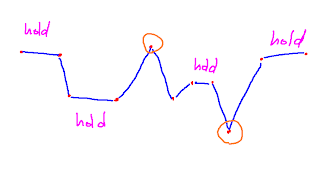
Yes, I guess this method really works well especially when we animate in pose-to-pose, but the thing for me is sometimes this ends up with very solid, not fluid movement. Of course, as I had drawn intestinally, hold should not be just “Hold” but needs to be added some more ease-in and out, spacing stuff. Even though, sometimes still looks solid.

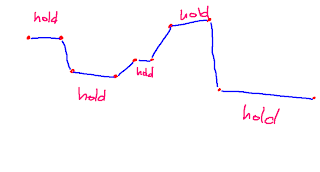
Yesterday I was working on my animation test and, dealt with my timing really carefully (since the main focus right is timing and spacing for me), I didn’t know why but I could not get the timing I wanted. So what I did was DELETE some pose of the end of the hold. This is how it looked.


This is not something new actually; this is just all about,

We don’t have to hold so long every time!!

But I didn’t notice that this really helped me change and add variety of timing in animation (in this illustration, those poses might look more breakdown but I guess it’ OK as long as it works).

I guess now I understand what Tom meant at that time.

09 August 2011

Louie

Today was the last day of this semester, and I know I learned a lot. Now, I'm going to take some break (which doesn't mean I'm not gonna study animation though, I mean I will stay away from computer :D ), and Sean just told me to watch this to think "timing".

Sean said the comedy timing is really useful for animation so he just recommended me to watch twice. First time, I understand the jokes and then I can more focus on timing of the jokes.

Another thing I noticed when I saw this was how much each subtle pose helped to understand what he is thinking. I think especially in comedy, a lot of complex thought are showing, sometimes they are clear and sometimes not.

Anyway, I and Sean talked a lot today and I will pose what he told me as an article later, I need to watch this again and pack my bag too.

07 August 2011

Hold me tight!

I have been studying timing and spacing theses days especially, and one thing I notice that "HOLD" is really important to make contrast in timing (which is not something "WOW NEW INVENTION!!GENIUS!!" tutorial just a basic principal but Sean just told me we need to go back to basic once we learned everything)

Here's my clips from my animation test...


I think it's fairly OK...for me, looked slightly same rhythm, beat..pon,pon,pon...something like that. I wanted more contrast, something that BREAKS my good boy timing. So far, the timing is like that.
the last timing was not same as other two poses but still same for me, I wanted more clear contrast, Having said that, I still liked the transition timing, one pose to another. So what i did was to change the "HOLD" timing, not "TRANSITION" timing.

Now the timing for looks more like...this!
I liked that, and I will go with this timing. Yes, one thing I noticed from this was, when we need to change the timing, we have to think two different timing. "HOLD"and"TRANSITION"timings.
When we have two poses like this, we have to think the timing. We have to think timing carefully because timing and spacing is everything in animation. I used to only have one question before...

How long does it take one pose to another?
but sometimes it's really difficult to put variety of timing in animation because the character's action needs to be physically correct, otherwise we are going to lost believability. Audience doesn't believe this character is alive. So what we can change then is...hold!! Here's another question to myself.

How long does it hold until the next movement?
Now I have a lot of different options when I think of timing, and I remember some animators said "HOLD" is really important to show character's thought process. I will need to consider every time. I will hold this idea tight not to forget!!


Bad Acting Speed


Acting speed depends on the character's emotion, in the certain circumstance. I kind of liked this acting, when he reacts what he saw on the dish. He goes like..frozen. I used to like this contrast and pose BUT, what do you think he's seeing inside that? He moves super quick and frozen...umm I was actually thinking inside that was something he does't like but look at his face!!

He is more like SCARED!!...it actually more looks like someone pointing a gun to him...and I was like"what the hell is this crap pose, and timing?"

There's no great pose without any definition of circumstance, character and situation. I will change this pose and timing and will pose it later how this pose changes.

I remember what Pixar animator said, exaggeration is not big pose but -ER pose!! I need to change this pose more "ew I don't wanna eat this"er pose. and Tom also told me, acting speed depends on the emotion, if he is happy, he might move slowly and if he is surprised, he might move quickly (OF COURSE, the kind of happiness also need to be considered!! like... WHY he is happy? What is he surprised at?, which means he can move very very slow, even if he surprised) ...see? Depends!!

06 August 2011

Sulley's Take


Sulley's Take animation test, I animated this test by referencing in Sulley's take from Monsters, Inc. When he noticed someone's behind him and was trying to see what it is. This is really really great example for me because this is exactly what I was trying to get, variety of timing.

One of the things that I learned from this test was, great timing is not perfect. What I meant was the beauty of imperfection, look at when he is trying to see by turning his head to left, I can see his thought like (No!! not this way, something is the other way!!) . So he made made mistake, he was supposed to turn his head to right at the first place. So this is NOT perfect (or I should say the most practical) acting, BUT this is natural!! Imperfection is really natural and that what brings life to the characters. No one is perfect in real life.

From timing point of view, it is like we are playing some music instrument and suddenly stops, makes a mistake or change the beat...not perfect...but if this is a jazz improvising, how cool is it to do something like that?

I set the bar for myself, this quality of timing is the bar...no animation coming from myself anymore with boring timing. By the way, I think this way to test was really good for me. I didn't just rotoscope all the frames, instead, I had drawn all the key poses from the original clip, then I put them in the computer. From that point, I didn't watch the original clip so much. I just made animation by myself, created timing. I watched the original just only when I wanted to see some more breakdowns, (not only to copy from it but to study how to have the character move properly). Funny thing is though, my timing turned out faster than the original, but looks to work well, I think I was using different rig and this guy is not as heavy as Sulley for sure that's why he is supposed to move faster than Sulley and works well.

03 August 2011

Brendan Body's Blog: Tutorials

Brendan Body's Blog: Tutorials


RHYTHM & TIMING

RHYTHM & TIMING

This basic rule of acceleration and deceleration of an action also applies to a musical background,
- The animator must constantly be aware of beats and accents. And there is no accented position, when action is all evenly spaced.
- NOTE: The faster the beat, the more accurate the hit or accent must be.
- A beat constitutes a specific interval of time. It applies to both the musical beat and action tempo. A 24 beat means 1 beat per second or every 24 frames.
- The measure of time established by the musical tempo must be broken down into audible taps. A metronome is normally necessary to measure the rhythm.
- A 12 beat action would be equivalent of 2 taps per second. If the tempo quickens to an 8 beat, this represents 3 taps per second. Only violent action will require anbimating as fast as an 8 beat.
- Accuracy is especially important if the beat is faster than a 9 beat. The hit must occur exactly on the cue frame which receives the tap.
- This applies also to rapid dialogue. The mouth positions must occur exactly on the frame of the corresponding sound. And the action must change on every frame. Animate in ones.
(When a slower beat is used, such as a 12 or 16 beat, the accented action may hit two frames before the frame of the tap. Greater impact is also provided through extended contact).
- When the rhytm of the dialogue is relaxed and conversational, the lip movements should be started two frames ahead of sound. Depending on phonetics, it takes one or two frames to form certain letters before sound is spelled.
- Remember: the faster the beat, the more accurate the accent - and the lip movement must be synced exactly as indicated on the exposure sheet.
- These rules also apply to sound effects.

25 July 2011

VNOG Blog: 3 Speeds

VNOG Blog: 3 Speeds

やべーこれ。役に立ちすぎ。PDFにして印刷して壁に貼っとこ。

"Something I heard back when I was first learning animation that still really helps me to this day: always try to get three speeds in your shot. Put in slow moves, medium moves, and fast moves. This will help give your shot texture, interest, and emphasis. If you can have different parts of the body moving at different speeds, even better! Take a look at this clip from 101 Dalmatians. This animation is beautiful in many ways, all of which I wont go into here, but pay particular attention to the timing of the actions. Pongo is sleepy, so naturally there are lots of slow movements. But there are also faster moves for emphasis, such as the ear scratch, the collapse at the end where he lets gravity take over, or the high frequency shaking during the stretch. Not only are there three different speeds of animation, but some of these speeds are happening simultaneously. Another example would be to have a character shaking his head as he raises his arms up slowly in anticipation of a gesture. The more variation you can add to your timing, the better. I see a lot of student work where the characters are always moving in a "snappy" fashion. This is fun to watch for a while, but soon the timing becomes boring because there is no contrast. So don't forget to shift gears!!"